
TuneAIBot Service Overview & Introduction
Sales AI and Customer Service AI. Both Start with Enterprise Knowledge.
TuneAIBot is an AI operations platform that integrates and automates customer inquiry handling for businesses.
What Is TuneAIBot?
TuneAIBot is an enterprise AI operations platform that automates customer support across multiple channels using industry-specific AI.
Are You Facing These Customer Support Challenges?
Are your staff repeatedly giving the same explanations and spending too much time checking availability and explaining products in response to inquiries coming from LINE, email, web chat, social media, and other channels?
As the number of inquiries increases, human-dependent support approaches their limit.
- The same questions keep coming in through LINE, email, and social media
Each channel is handled separately, and responses vary depending on the staff member. - Checking availability and explaining products takes time every time
Staff cannot respond immediately because they must check admin systems or Excel files while replying. - After-hours inquiries are being missed
Inquiries received at night or from overseas go unanswered, resulting in lost opportunities. - Only experienced staff can answer accurately
Training new staff takes time, and operations remain dependent on specific individuals. - You tried AI, but it was not practical for real operations
General-purpose chatbots could not understand product conditions or the latest operational status, and were not reliable enough for real business use.
Its purpose is not just automatic replies, but supporting customer service in a way that fits your actual business operations.
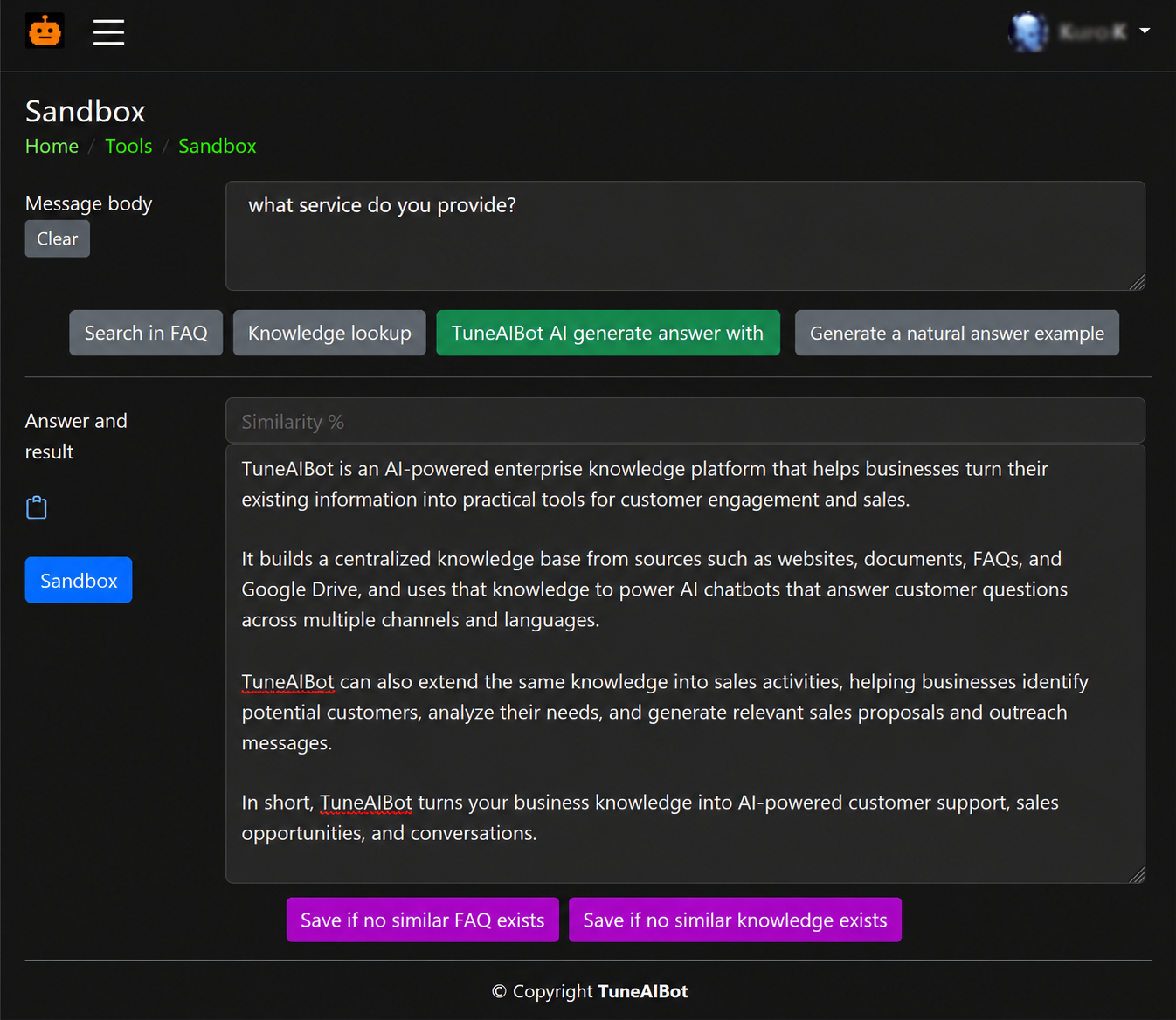
Human Review Ensures Quality and Builds Your FAQ and Knowledge Base
Inquiries that are difficult to answer automatically are reviewed by humans, and approved responses are stored as reusable assets. Similar inquiries can then receive consistent responses in the future.
- Only cases that need human review are routed for review
- Approved responses are added to the FAQ and knowledge base for reuse
- The more you operate it, the more response accuracy and speed improve
Why You Can Operate AI with Confidence
You can review the reasoning behind auto-generated responses from the admin dashboard.
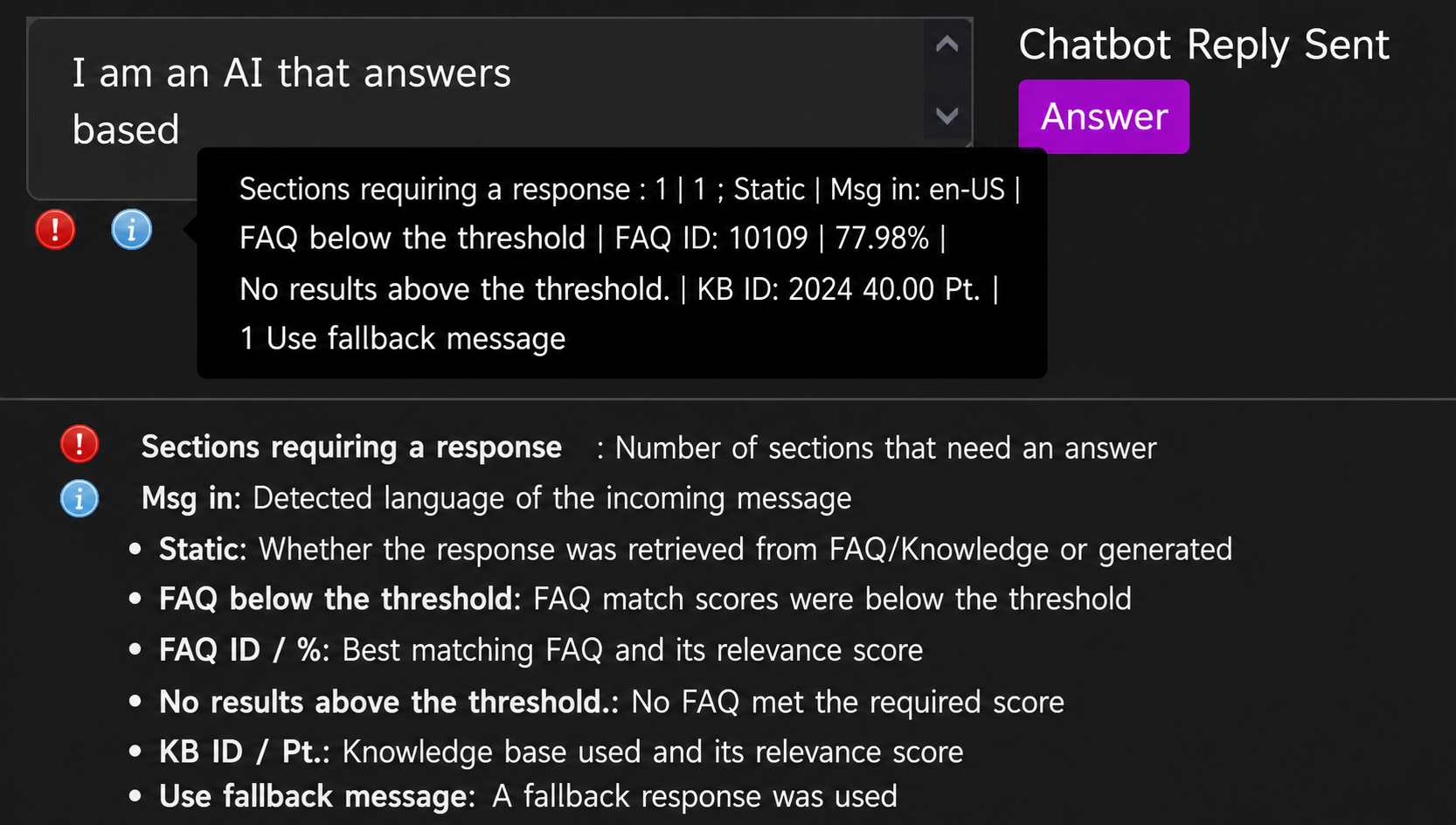
- You can review which FAQ and knowledge entries were referenced
- The reason why an automatic response was sent is displayed
- You can trace the response process in one click
Rather than treating AI as a black box, TuneAIBot is designed on the premise that humans can manage and verify it.
Review the Knowledge Referenced by the AI at a Glance
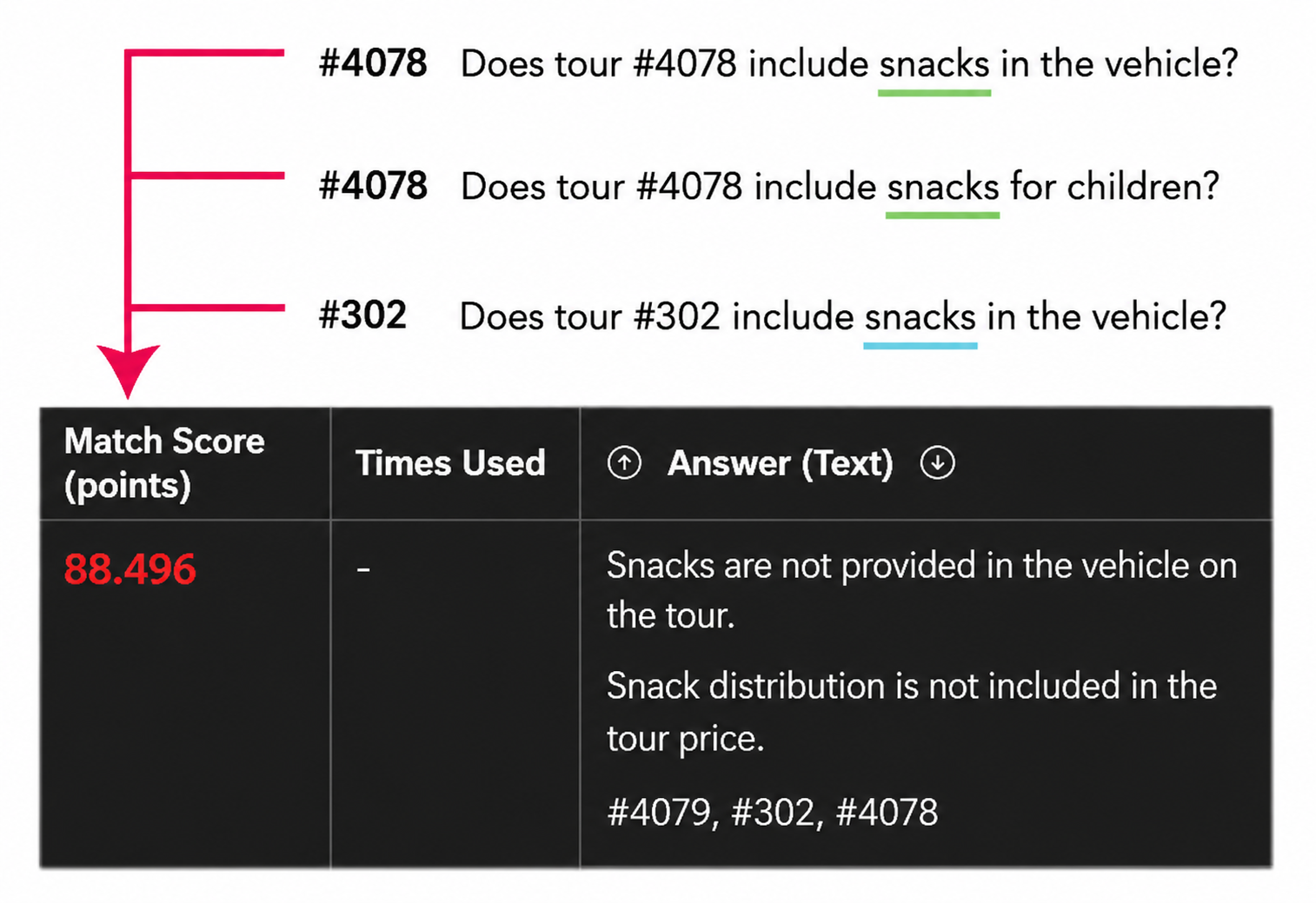
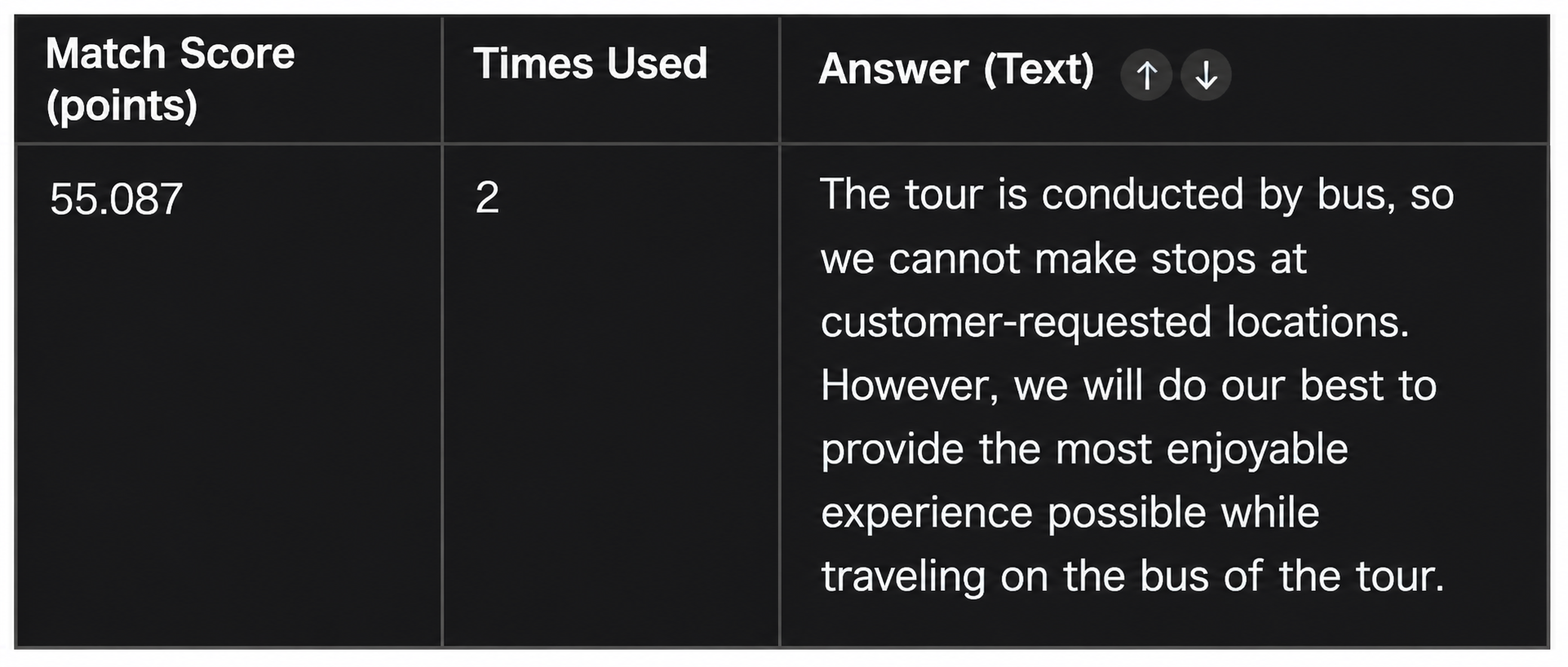
Check the evidence the AI reads using match scores and thresholds (*set numerically by the customer). Questions with the same intent converge on the same knowledge entry, making responses more consistent.
- Maintain auto-reply quality by referencing only entries above a threshold (for example, 80 points)
- Instantly see which knowledge entries were selected in a list, without turning AI into a black box
- Lower-visibility display for low-scoring knowledge that will not be read (for example, white text)
Learn More About Visualizing the AI Decision Process
What TuneAIBot Can Do (Core Features)
It understands product information, FAQs, operational rules, availability data, and more across your business, and automatically generates appropriate responses based on each inquiry. Rather than sending only fixed template replies, it can respond in a way that reflects actual business conditions.
When a tour is full, for example, it can suggest similar alternatives, turning customer service from a simple answering task into a proposal-driven operation.
- Integrate Customer Inquiries Across Multiple Channels into One AI
- Answer by Understanding Internal Information and Product Knowledge
- Automate Everything from Availability Checks to Alternative Suggestions
Visualize the Results of AI Operations
Review AI Performance on the Dashboard
With TuneAIBot, you can review from the admin dashboard how much customer support the AI has automated and how much operational work it has reduced.
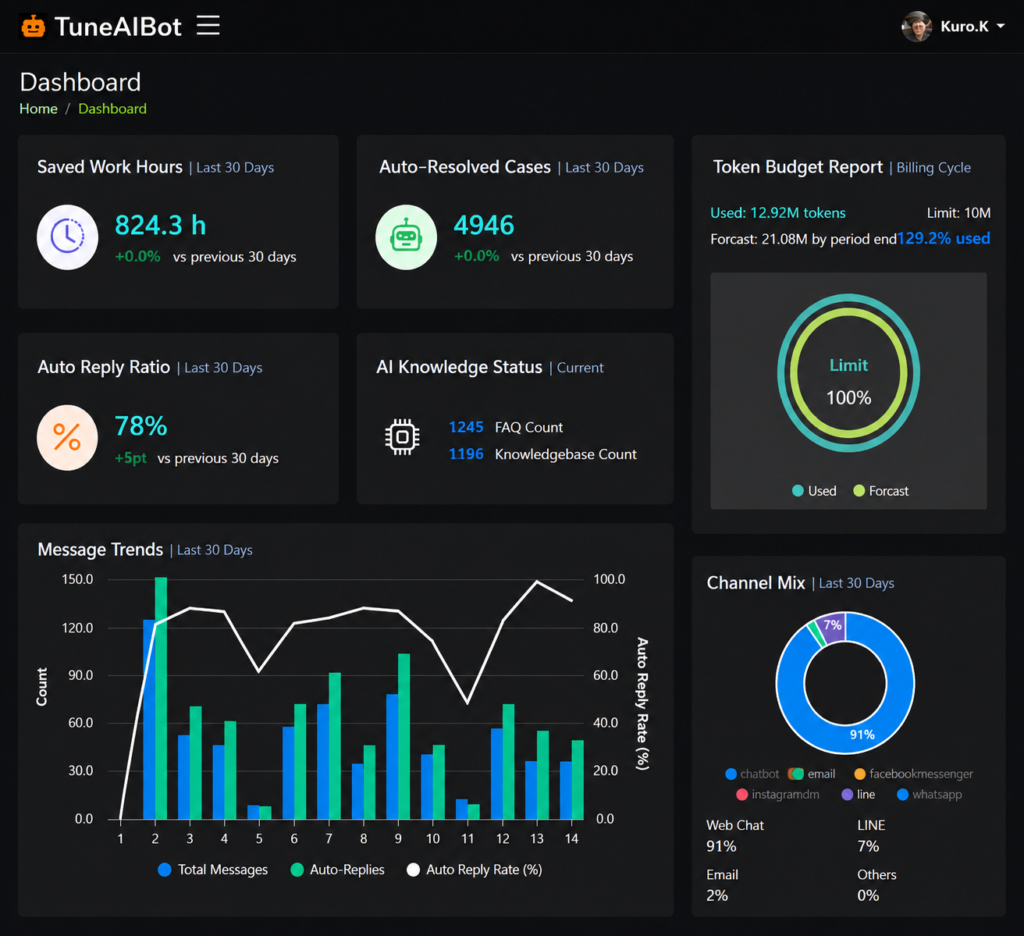
You can continuously monitor the effects of AI operations by visualizing metrics such as auto-reply rate, labor savings, and number of handled inquiries.
How to Get Started
Service Plans
You can start by automating only part of your customer inquiries, then expand to additional channels and more advanced integrations as operations grow. This allows you to start small and gradually broaden your AI operations.
- For companies that want to start with a trial
- For companies that want to fully automate customer support
- For large-scale operations and business system integrations
- Entry Plan (For Small-Scale Implementation)
- Standard Plan (For Standard Operations)
- Enterprise Plan (For Advanced Integration and Large-Scale Operations)
Security and Safety
Regarding message content and business data handling, it clearly defines “where data is stored,” “whether it is sent externally,” and “who can access it,” so companies can operate it in a controlled and manageable way.
- Security-first design for enterprise data
- Operations that do not treat AI as a black box
- Administrator review and control are possible
Extensions
Evaluate Feasibility in 10 Minutes
Simply select your current setup, including channels, FAQ/knowledge, and availability/product data, and you can see what range of operations TuneAIBot can automate.
*This is not based on sales outreach. You can use it purely as part of your evaluation.